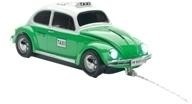
Pawas VW Käfer Mexico-Taxi
Produktdetails
- Anzahl der Tasten: 3
- Funktionen: Scroll-Funktion
- Bildlauf: 2-Wege
- Scroll-Rad: ja
Welche Fragen hast du zum Produkt? beta
Testberichte

03/2011
Zusammenfassung
'Mouse Trap' (zu Deutsch Mausefalle) heißt dieses nette, kleine Gelegenheitsspiel, das ich getestet habe und der Name ist Programm. Hilf einer kleinen Maus, den Weg aus der Mausefalle zu finden, damit sie darin nicht verhungert oder sonst irgendwie einen schrecklichen Tod stirbt...
Fazit
... Aber genau das macht die Schwierigkeit des Spiels vor allem in den höheren Levels aus, in denen man viele Hindernisse aus dem Weg der Maus zu räumen hat. Ist die Maus raus aus der Falle, so ist der Level automatisch beendet und man kann mit dem nächsten beginnen. ...

02/2011
Stärken
Schwächen
One look at Swiftpoint Limited’s minuscule Swiftpoint Mouse (just over two inches long, about 1.5 inches across at the widest point, and weighing less than an ounce), and you might think the company has simply tried to make the smallest mouse on the market. But this tiny size serves a purpose: The Swiftpoint aims to be the ultimate travel mouse by letting you use it in settings—say, while your MacBook is on your lap, or when working on a plane—when the only flat surface is your laptop’s own palmrest. That’s right: The Swiftpoint Mouse is small enough and precise enough (1,000 dpi) that you can stick it on your MacBook Air’s palmrest and mouse about when there’s no other flat surface in sight. ...
Fazit
For those who prefer a mouse to a trackpad, the Swiftpoint Mouse works in even the tightest of workspaces. It won't replace your desktop mouse, but in cramped quarters, it shines, giving you a usable, comfortable input device that even works on your MacBook’s palmrest. The company has anticipated some of the biggest obstacles to such use, and has included features and accessories that address most of these challenges. It’s a clever product that’s as portable as a mouse can be, and it works well enough that some road warriors might even end up using it full-time.

05/2010
Zusammenfassung
Wer sich ständig mit dem Kabelgetoddel seiner Maus auf dem Schreibtisch herumplagt, dem kann vielleicht geholfen werden: das Mouse Bungee ist in Deutschland angekommen. Es handelt sich um ein Produkt aus dem Bereich 'Maus und Zubehör' und soll dem Kabelmausbesitzer das Leben leichter machen. ...
Fazit
Es ist schwierig, das Mouse Bungee zu bewerten. Viele Gamer dürften mit dem Ding Probleme haben, weil die plötzliche Kabelfreiheit ihre Grenzen in der festgestellten Kabellänge hat. Viele andere Gamer werden das wiederum mögen. Ich persönlich finde es zu gewöhnungsbedürftig. Dennoch: Das Gerät ist nicht teuer und in verschiedenen Ausführungen ab 13 Euro erhältlich.
04/2010
Zusammenfassung
Apple’s Magic Mouse, with its multitouch functionality, is quite a step up from Apple’s previous models, but many users wish they could do more with that feature—the Magic Mouse’s multitouch surface is currently limited to scrolling, zooming the screen, and two-finger swiping (to, say, cycle through photos in Preview or iPhoto). Thankfully, just as a number of utilities such as Jitouch, BetterTouchTool, and MultiClutch have been released to increase the functionality of Apple’s multitouch trackpads, we’ve started to see similar utilities for the Magic Mouse. ...
Fazit
If you’ve got a Magic Mouse and wish you could take better advantage of its technology, you owe it to yourself—and your mouse—to give MagicPrefs a try. Given that it’s free, what do you have to lose?
Details
Produktdetails
- Anzahl der Tasten: 3
- Funktionen: Scroll-Funktion
- Bildlauf: 2-Wege
- Scroll-Rad: ja
Ausstattung |
|
| Anzahl der Tasten | 3 |
| Funktionen | Scroll-Funktion |
| Bildlauf | 2-Wege |
| Scroll-Rad | ja |
Anschlüsse |
|
| Signaleingang | optisch, LED |
| Anschlusstechnik | USB 2.0 |
Generelle Merkmale |
|
| Farbe | grün |
| Signalübertragung | Kabel |
| Unterstützte Plattform | PC / Mac |
| Produkttyp | PC-Maus |
| Veröffentlichungsdatum | 24-06-2011 |
|
|
|
| Druckauflösung | 800 dpi |
Zusätzliche Produktinformationen |
|
| Recycling | Entsorgungshinweis |


